How to Respond to a Referral You Received Through exacare ai
Last updated: October 5, 2026
Who this is for
Home Health, Hospice, Dialysis, DME, SNF, hospital, or other agency staff who received a referral by email from exacare ai
Anyone without an exacare account who's received an exacare referral and is learning how to respond
When to use this article
Use this if a facility sent you a patient referral through exacare ai and you're not sure what exacare is, whether you need to pay for it, or how to respond.
exacare ai is software the sending facility uses to manage patient discharges and referrals. You don't need an account, and there's no cost to you — it's free to view and respond to a referral sent to you this way.
Before you start
Make sure you have the email exacare ai sent you:
From: noreply@exacare.com
Subject: "You have a new referral from ExaCare AI"
If you can't find it, check your spam or junk folder — this may be the first email you've gotten from exacare ai, so your email provider may not recognize the sender yet.
Step-by-step instructions
Open the email from noreply@exacare.com with the subject "You have a new referral from exacare AI."
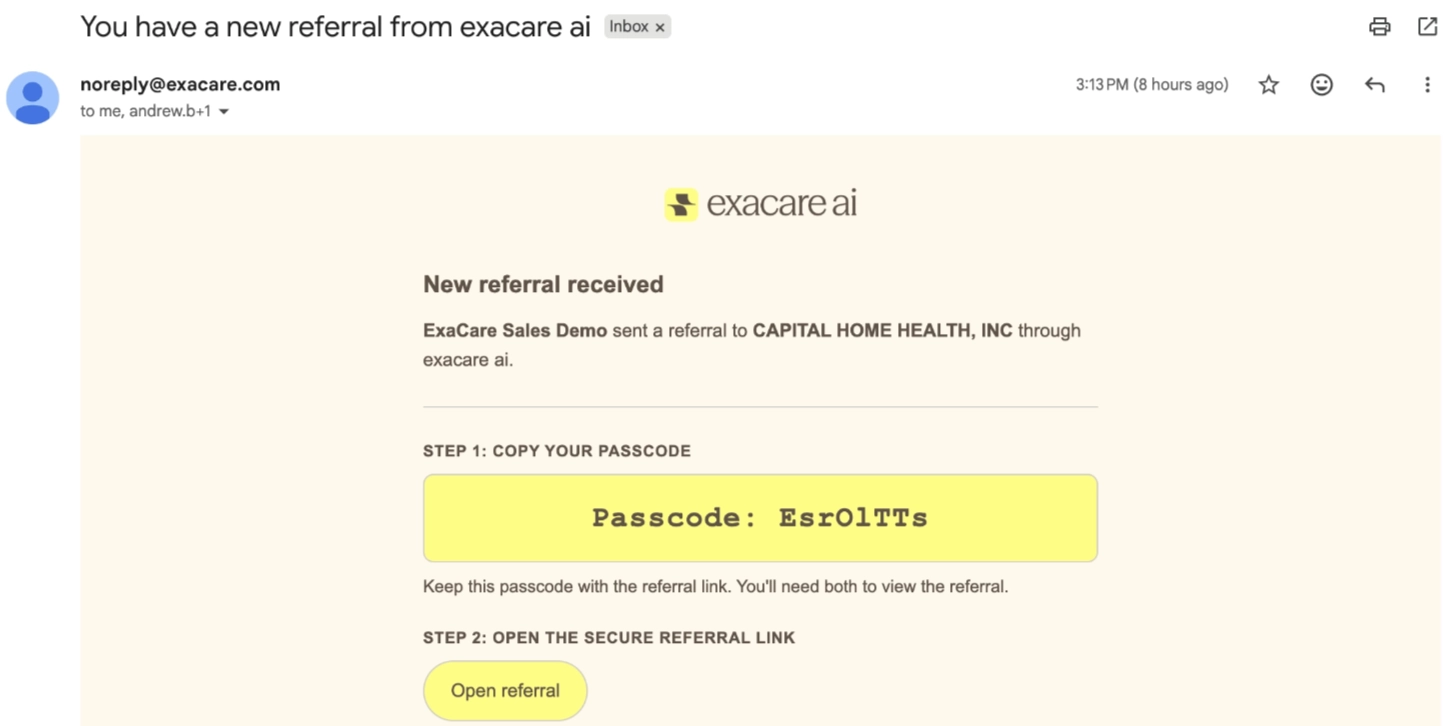
Click the secure link in the email to open the referral. You don't need to create an account, log in, or download anything.
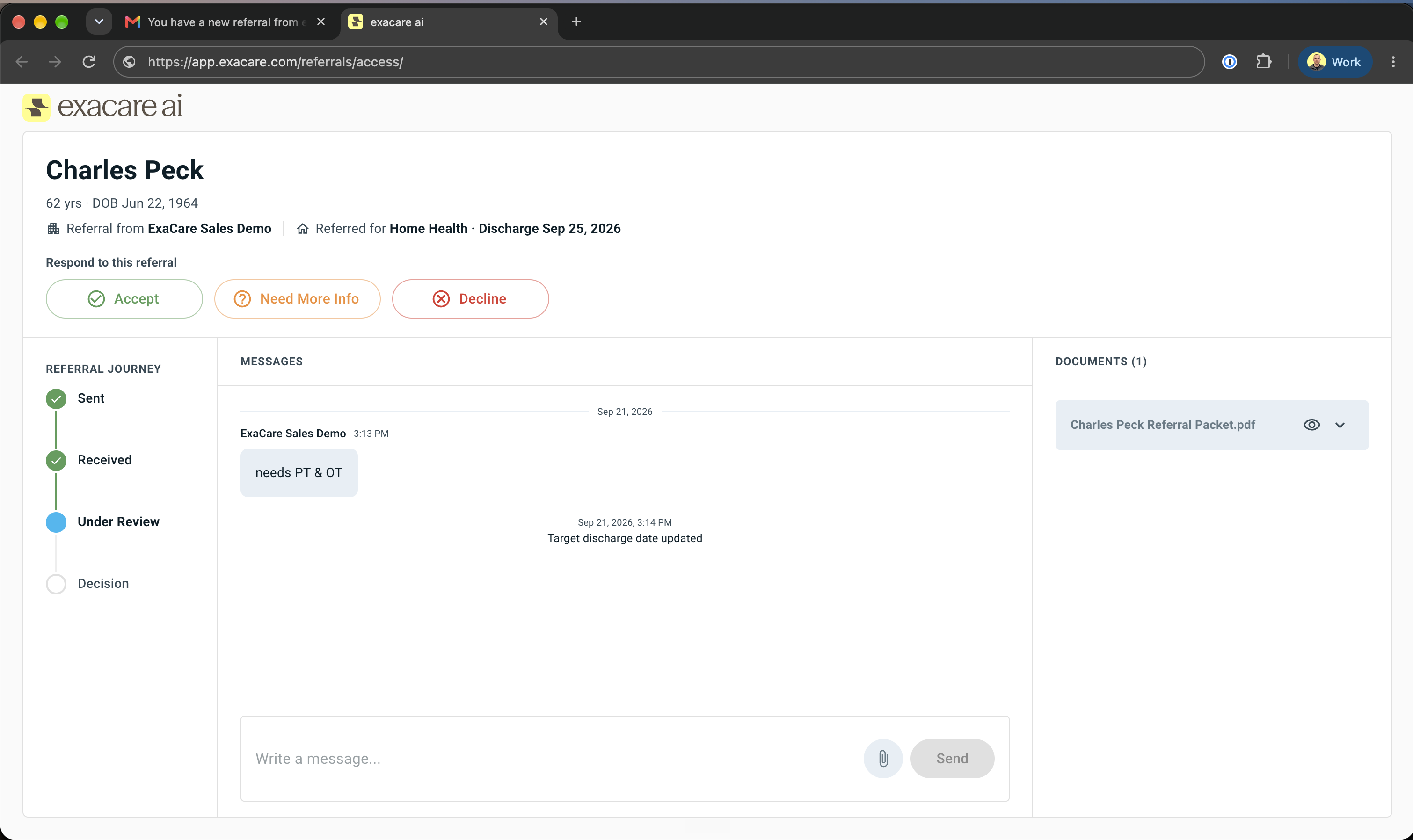
Review the patient information and attached documents (for example, the face sheet, H&P, and recent results) directly on the page.
If you need to add a document, such as a signed Letter of Agreement (LOA), upload it directly to the referral.
Respond to the referral by clicking Accept, Decline, or Need More Info. Confirm your choice when asked.
What happens next
Your response goes straight back to the sending facility right away. You don't need to call or email them to confirm you got it.
If you have a follow-up question, use the message thread on the referral. The sending facility sees it immediately.
If the sending facility uploads more documents later, you'll see them on the same referral - no need to check a separate email.
If the sending facility sends you a message you haven't read yet, you'll get an email notification - you don't need to keep the page open or check back to see if there's something new.
FAQs
Do I have to pay to use this?
No. There's no cost to you to view or respond to a referral sent through exacare ai. You're never asked for payment or billing information.
Do I need to create an exacare account?
No. The link in your email gives you everything you need to review and respond to this referral. You don't need to sign up or download anything.
I got the email, but I'm not sure it's legitimate! What is exacare ai?
exacare ai is software used by the facility that referred you a patient to manage discharges and referrals. The email comes from noreply@exacare.com. If you want to confirm it's genuine, contact the facility that referred the patient directly. They can confirm they sent it.
Can I upload my own documents, like a signed LOA?
Yes. You can upload documents directly to the referral. The sending facility sees them right away.
What if I can't find the email?
Check your spam or junk folder for a message from noreply@exacare.com with the subject "You have a new referral from ExaCare AI." If you still can't find it, contact the facility that referred the patient - they can resend it.
Will I need to do this again for future referrals from the same facility?
Yes, each new referral arrives as its own email with its own secure link. You'll follow these same steps each time.
When to contact exacare Support
If the link in your email isn't working, or you're having trouble responding:
Email our support team at help@exacare.com
Interested in exacare ai for your own organization?
If you'd like to talk to the exacare ai team - questions, feedback, or interest in using exacare ai's AI-powered features and rich reporting at your own organization - book time with our team.