2. Push to PointClickCare FAQ
Last updated: June 11, 2026
Please refer to the training video below for a Push to PCC Tutorial
General Questions:
Q: I can’t find the referral in PointClickCare after I accepted it from ‘External Pending’?
Double check you are in the correct facility
We recommend checking the “Waitlist” box when the resident profile opens up after accepting from ‘External Pending’ so it goes to the ‘Waiting List’ tab, if you do not check the box then it goes directly to the ‘Residents’ list
The resident was merged and the “Waitlist” box was not checked, it goes wherever the original resident is located
Q: Why does exacare say the resident doesn’t exist in PointClickCare, and prompt me to ‘Reset the Push’?
This may occur if the resident that you accepted from ‘External Pending’ was since deleted or exists in a different PointClickCare status that is inaccessible to exacare (e.g., archived, merged, access restricted).
This requires you to reset the push and begin from Step 1


Q: What happens if a referral is deleted in PointClickCare after being pushed from exacare?
You can click next and then an option will appear to reset the push and start over

Q: Why is the ‘PointClickCare’ chip grey?
PointClickCare chips in the referral profile and on the ‘Screener’ page will remain grey until the push is complete. This happens after the referral has been pushed from exacare to PointClickCare, accepted in PointClickCare, and additional details have been pushed to PointClickCare. The chip will turn green at this point.
Q: What do I do when I get a PointClickCare error?
Click ‘View’ to locate the source of the error
Edit the relevant field (e.g., contact relationship), then rerun the push
Spike violation errors can happen if you exceed a time window to execute a task.
If it is unclear, take a screen of the error and send it to us in the in-app chat!
Q: Does this push to the EHR or CRM side? Will I still need to track leads in PointClickCare CRM manually?
This pushes to the EHR side of PCC
You will need to add leads to PointClickCare manually
Q: What if a resident doesn’t appear as a merge option during the “External Pending” step in PointClickCare?
A naming mismatch may prevent the match
Check for alternate spellings or naming variations
Step 3: In PCC Questions
Preliminaries & Contacts
Q: What if the relationship field in PointClickCare is invalid (e.g., “In-Law”)?
Try selecting “Other” if “In-Law” is not available in the system
Q: Will I always have to add the NPI & phone number for a source hospital?
Yes, this is a requirement from PointClickCare
If the source hospital already has this data saved in exacare, this will pre-fill
If you do not have this data saved, you will need to add it the first time then you click ‘Update & Save’ so future referrals from this source will have this information pre-filled

Q: Where do I find the contacts in PointClickCare?
Contacts may push directly to the resident profile in PointClickCare or may need to be approved from the Admin Dashboard under Inbound Resident Contacts.
Check the 'Contacts Pending' section in PointClickCare (Home -> Admin Dashboard -> Inbound Resident Contacts). Sometimes PointClickCare puts the contacts there if they might match other existing residents contacts.
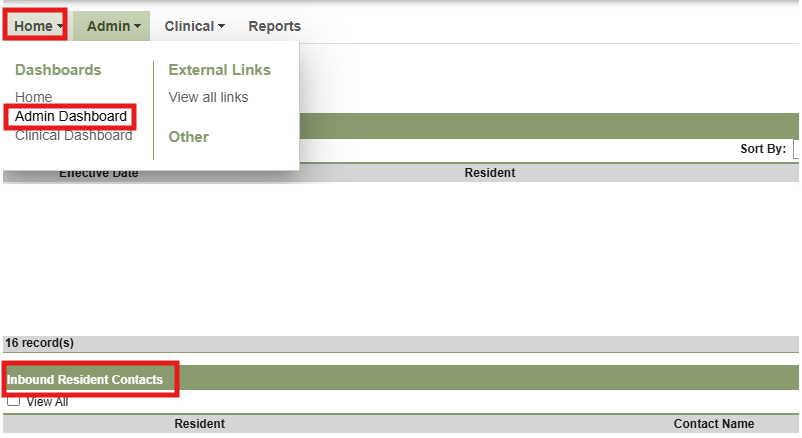
Select review to assign the contact to the associated resident
From the review tab you will be able to review the inbound contact information against the contact information currently existing in PointClickCare. You can choose to create a new contact, link existing contact, or link existing contact and update
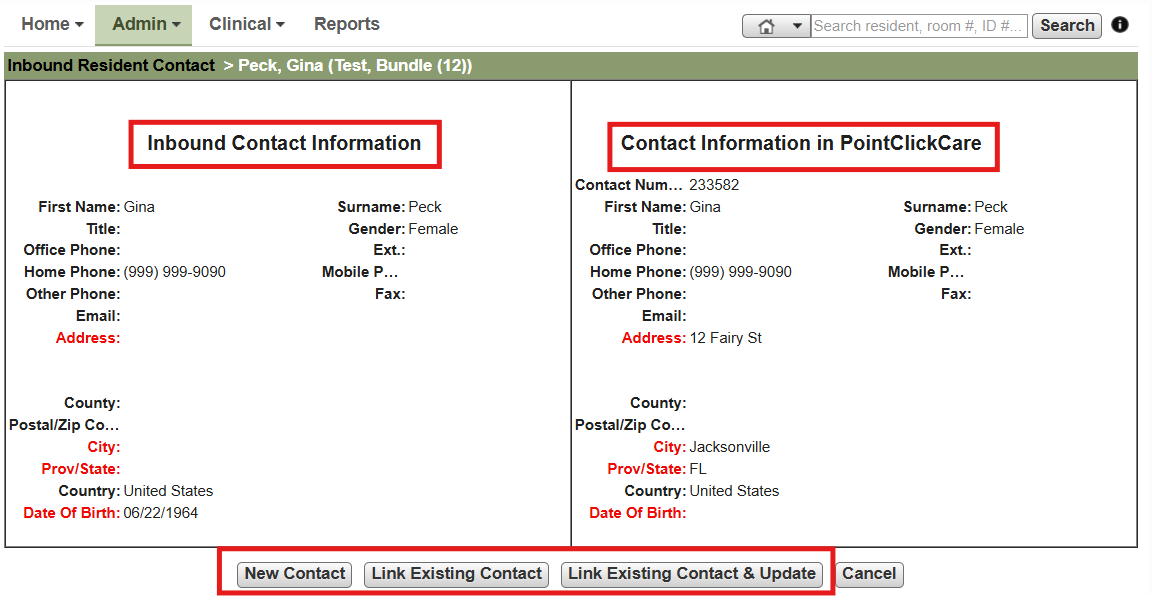
If you do not have access to the Inbound Resident Contacts submit a support ticket to PCC to request access
Allergies + Conditions
Q: Why is the onset date for a condition set to today’s date?
If the AI can’t find one, today’s date is set by default (required by PointClickCare) → you can manually change this
Q: What is the ‘Referral Conditions’ section for in the second push to PointClickCare and how is that filled?
That is for any medical conditions the AI finds and pulls ICD-10 codes for
If the packet has ICD-10 codes, it will pull those directly
Q: Where do allergies and conditions push to in PointClickCare?
Most often, conditions and allergies will go to a tab called ‘Inbound’ then you need to approve them from here (Home -> Admin or Clinical Dashboard), this varies by organization’s PointClickCare configuration
Documents
Q: Do I need to re-analyze when new docs come in before I can push those documents to PointClickCare?
Yes, this is to prevent the AI from hallucinating any information, and ensuring that the additional information is always up to date